Apache Iceberg
Iceberg Explorer
Iceberg Explorer is an interactive visualization I wrote to make Iceberg’s internals tangible. You can simulate operations like append, delete and compact to see how and what files are created “under the hood” and you can also time-travel back through snapshots.
It has three levels of details that show more and more concepts.
Notes from my Apache Iceberg learnings
- Iceberg is a table format (not a file format, not an engine, not a service)
- it’s engine-agnostic: Spark, Flink, Trino, Dremio, DuckDB and others can all read and write the same table concurrently
- the data files are usually Parquet, but ORC and Avro are also supported
- it is a specification for a “tree of metadata files that turns a bucket of Parquet into something you can call a table”
- supports atomic commits, schema evolution, hidden partitioning, and time travel
- every file (data or metadata) is immutable
- the metadata tree has multiple layers: metadata file -> manifest lists -> manifest files -> data files
- a snapshot is the root of one version of the table; committing swaps the “current” pointer to a new metadata file
- atomic commits work by an atomic compare-and-swap on that pointer, so writes either fully succeed or leave the table untouched
- a catalog is what tracks the pointer to the current metadata file for each table (REST, Hive, Glue, …)
- reads are fast because manifests carry per-file column stats (min/max, null counts), letting engines prune files before opening them
- time travel and rollback are free: old snapshots stay valid until expired, since nothing is mutated in place
- schema evolution tracks columns by a stable field ID, not by name or position, so renames and reorders are safe metadata-only changes
- the REST catalog spec is the convergence point because it decouples engines from catalog implementations behind one HTTP API
- concurrent writers are handled with optimistic concurrency: a writer builds its new metadata, then retries the compare-and-swap if someone else committed first
- stale snapshots and small files accumulate, so maintenance (expire snapshots, compaction, orphan-file cleanup) is required
- partition evolution changes only how new data is laid out; old data keeps its original partitioning and both are queried correctly via split planning
- sort order can be declared per-table so engines cluster data on write, improving min/max pruning
Other cool features
Hidden partitioning
In the old Hive world, partitioning was physical and exposed. Partitioning by day meant storing an extra event_day column next to our real event_ts, and queries only got the speedup if they filtered on that derived column:
-- Hive: scans everything, because the query filters ts, not event_day
SELECT * FROM events WHERE ts = '2026-07-11';
-- had to know to write this instead:
SELECT * FROM events WHERE event_day = '2026-07-11';
Iceberg stores the transform itself in metadata (e.g. partition by day(ts)). The derived value is tracked internally, not as a user-visible column, so we write the natural query and Iceberg applies day() to our predicate and prunes partitions for us:
SELECT * FROM events WHERE ts = '2026-07-11'; -- Iceberg prunes automatically
- queries filter on the real column (no extra predicate columns to remember)
- because the partition spec is just metadata, we can evolve it without rewriting existing data
Row-level deletes: copy-on-write vs merge-on-read
Data files are immutable, so we can’t edit a row in place. Deletes and updates use one of two strategies that trade write cost against read cost:
- Copy-on-write (CoW): rewrite the entire data file(s) containing the affected rows, minus the deleted rows. Writes are expensive (rewrite a whole file to change one row), reads are cheap (data files are always clean). Good for read-heavy tables with infrequent updates.
- Merge-on-read (MoR): leave the data file untouched and write a small separate delete file recording which rows are gone. Writes are cheap (append a small file), reads are more expensive (the engine merges data files with their delete files at query time). Good for frequent updates/CDC, but needs periodic compaction to fold the delete files back in.
Spec versions (v1, v2, v3)
The table format is a versioned spec, and each table declares which version it uses.
- v1: the original, essentially append-only semantics. No native concept of deleting individual rows.
- v2: adds row-level deletes (the delete-file mechanism that makes merge-on-read possible), enabling efficient updates/upserts and CDC ingestion. Most tables today are v2.
- v3: in progress. Adds deletion vectors (a compact bitmap of deleted rows, replacing the older positional-delete files and faster to apply at read time) and new types (nanosecond timestamps, a variant/semi-structured type, and more).
Branching, tagging, and write-audit-publish
Because a table is just a pointer to a snapshot and old snapshots stay valid, Iceberg supports git-like semantics:
- Branch: a named, movable pointer to a line of snapshots (like a git branch). You can write to it without affecting
main. - Tag: a named, fixed pointer to one specific snapshot (like a git tag), e.g.
end-of-2026-Q2for audit/retention.
WAP (write-audit-publish) is the workflow this enables:
- Write: the ETL job writes new data to a staging branch, not
main. Consumers readingmainsee nothing yet. - Audit: run data-quality checks against the branch (row counts, nulls, schema, business rules). If they fail, discard the branch; production was never touched.
- Publish: once checks pass, atomically fast-forward
mainto the branch’s snapshot, so readers see the validated data all at once.
It’s all pointer swaps on immutable snapshots, so staging and publishing are cheap and atomic with no copying.
Some code explorations
I poked at a real table with pyiceberg and no infrastructure, just to watch the files appear on disk as I append and delete.
# Set up virtual env
uv venv
uv init
uv add jupyterlab ipykernel pyiceberg pyarrow
uv run jupyter lab

mkdir warehouse
First a couple of helpers to dump the raw Avro (manifests) and Parquet (data) files so we can see what Iceberg writes:
from itertools import islice
import json
import pyarrow.parquet as pq
from pyiceberg.avro.file import AvroFile
from pyiceberg.io.pyarrow import PyArrowFileIO


def print_avro_files(avro_files):
    io = PyArrowFileIO()
    for avro_path in avro_files:
        print(f"\n=== {avro_path} ===")
        with AvroFile(io.new_input(str(avro_path))) as avro:
            print("Schema:")
            print(avro.schema)
            print("\nFirst records:")
            for record in islice(avro, 10):
                print(record)


def print_parquet_files(parquet_files):
    for parquet_path in parquet_files:
        print(f"\n=== {parquet_path} ===")
        parquet_file = pq.ParquetFile(parquet_path)
        print("Schema:")
        print(parquet_file.schema_arrow)
        print("\nFirst rows:")
        batch = next(parquet_file.iter_batches(batch_size=10))
        for row in batch.to_pylist():
            print(json.dumps(row, indent=2, default=str))
Create a SQLite-backed catalog and a namespace. This is the whole “infrastructure”:
import pyarrow as pa
from pyiceberg.catalog.sql import SqlCatalog
from datetime import datetime
from pathlib import Path

wh = Path("warehouse").resolve()
wh.mkdir(exist_ok=True)

catalog = SqlCatalog(
    "local",
    uri=f"sqlite:///{wh}/catalog.db",
    warehouse=wh.as_uri(),
)
catalog.create_namespace("demo")
Create a table with three rows. Note that create_table writes only metadata, no data or snapshot yet:
events = pa.table({
    "event_id":   pa.array([1, 2, 3], pa.int64()),
    "user_id":    pa.array([101, 102, 101], pa.int64()),
    "event_type": pa.array(["click", "view", "purchase"]),
    "ts": pa.array([datetime(2025, 1, 1), datetime(2025, 1, 2), datetime(2025, 1, 3)], pa.timestamp("us")),
})

tbl = catalog.create_table("demo.events", schema=events.schema)
At this point there’s a single metadata.json with "snapshots":[], and no data/ directory at all. The table exists but is empty.
Now append the rows:
tbl.append(events)
That one call produces a whole subtree:
warehouse/demo/events/data:
  00000-0-beb7b213-...parquet          # the actual rows

warehouse/demo/events/metadata:
  00000-...metadata.json               # original (empty) table metadata
  00001-...metadata.json               # new: now has current-snapshot-id + snapshot entry
  beb7b213-...-m0.avro                 # manifest file  -> describes the data file
  snap-343347...-beb7b213-...avro      # manifest list  -> describes the manifest(s)
So a commit is: write the Parquet, write a manifest pointing at it, write a manifest list pointing at the manifest, write a new metadata.json, then atomically point the catalog at that new metadata file.
The two Avro layers are exactly the two pruning levels:
snap-*.avro (manifest list): one per snapshot (per commit). Each row describes one manifest file: its path, partition spec ID, added/existing/deleted file and row counts, and partition summaries (lower/upper bounds). The partition summaries let the planner skip an entire manifest without opening it if the query’s partition predicate falls outside the bounds. First level of pruning.
*-m0.avro (manifest file): each row describes one data file (or delete file), carrying the per-column min/max, null counts, etc. Second level of pruning: file-level skipping on column stats before any data file is touched. That’s why Iceberg can plan a query with pure metadata operations, no directory listings. In v2 manifests are typed: data manifests vs. delete manifests.
Append a second batch and a second data file + manifest + manifest list appear; the new manifest list references both manifests:
more_events = pa.table({
    "event_id":   pa.array([4, 5], pa.int64()),
    "user_id":    pa.array([101, 102], pa.int64()),
    "event_type": pa.array(["click", "click"]),
    "ts": pa.array([datetime(2025, 1, 4), datetime(2025, 1, 5)], pa.timestamp("us")),
})

tbl.append(more_events)
Now delete some rows to see merge-on-read in action:
tbl.delete("user_id = 102")
This doesn’t touch the existing data files. Instead it writes a new Parquet file containing the surviving rows of the affected file (00000-1-42a19abd-...parquet holds just event_id 1 and 3), plus new manifests and a new snapshot. The old files stay on disk and remain valid for time travel, until a maintenance job (expire snapshots + compaction) cleans them up.
The metadata tree
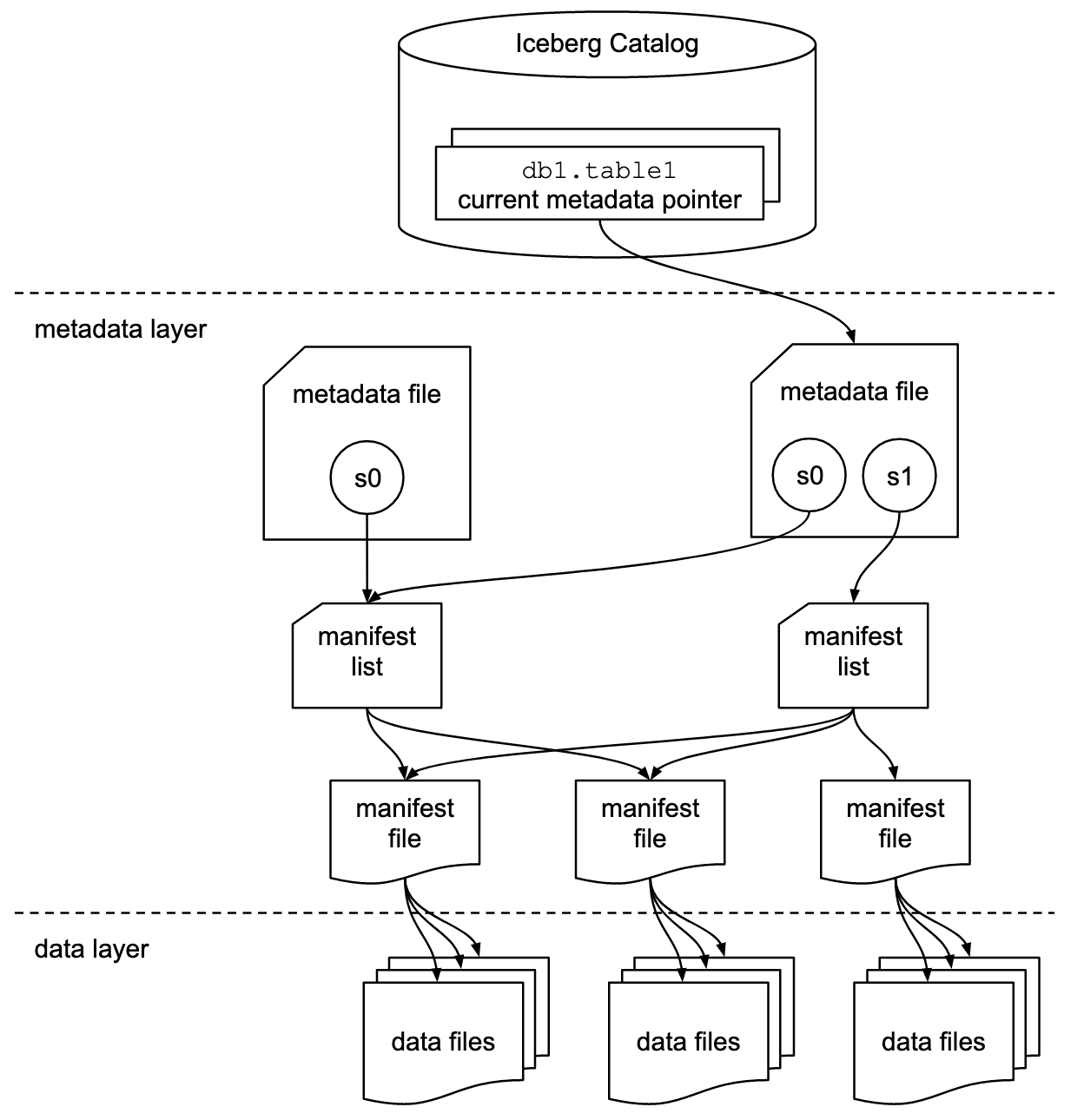
Diagram from the Apache Iceberg documentation, © the Apache Software Foundation, used under the Apache License 2.0.